People search for alternatives to Dropbox for a handful of recurring reasons: the free Basic plan gives you just 2 GB, paid plans jump straight from that to 2 TB with no mid-range option, and price-conscious or privacy-focused users want to see what else is out there before renewing.
The cloud storage market has matured well beyond Dropbox’s original playbook. You can now choose cheap cloud storage plans, privacy-first zero-knowledge encryption, one-time lifetime payments, or secure cloud storage with business-grade compliance — depending on what actually matters for your files.
This Dropbox alternatives 2026 roundup gives you a full cloud storage comparison across 10 options, with current USD pricing, storage limits, and standout features, plus guidance on matching a tool to your specific need. If your real need is sharing confidential business documents — M&A, due diligence, or investor materials — a virtual data room is worth considering too, and we cover where that fits in later in this article.
Dropbox Alternatives — Quick Comparison Table
| Tool | Price From | Free Tier | Standout Feature | Best For |
| Google Drive | $1.99/mo (100GB) | 15 GB | Docs/Sheets integration | Personal use, Google users |
| OneDrive | $1.99/mo (100GB) | 5 GB | Microsoft 365 integration | Microsoft 365 users |
| pCloud | $199 lifetime (500GB) | 10 GB | One-time lifetime payment | Photos & long-term storage |
| Sync.com | ~$8/mo (2TB, annual) | 5 GB | Zero-knowledge encryption | Privacy-focused users |
| Icedrive | ~$1.67/mo (150GB) | 10 GB | Clean interface, affordable | Budget users |
| MEGA | ~$5.34/mo (400GB) | 20 GB | Largest encrypted free tier | Free-tier seekers |
| Box | $15/user/mo | 10 GB | Advanced permissions & governance | Teams & businesses |
| Proton Drive | $3.99/mo (200GB) | ~1 GB | End-to-end encryption, Swiss jurisdiction | Maximum privacy |
| Nextcloud | Self-hosted (varies) | N/A | Full data control | IT-savvy businesses |
| Virtual Data Room | Custom quote | N/A | Audit trails, granular permissions | Confidential business documents |
10 Best Dropbox Alternatives in 2026
Here’s a closer look at each of the Dropbox alternatives from the table above, including what makes each one worth considering and where it falls short.
Google Drive
Google Drive is the most familiar Dropbox alternative for most people, mainly because so many already have a Google account. The free tier gives you 15 GB, shared across Gmail, Drive, and Photos. Paid plans through Google One start at $1.99/month for 100 GB and scale up to $9.99/month for 2 TB. The standout feature is deep integration with Google Docs, Sheets, and Slides, which makes real-time collaboration simple. The main limitation: your 15 GB free tier is shared with Gmail and Photos, so it fills up faster than it looks.
Microsoft OneDrive
OneDrive makes the most sense if you’re already paying for Microsoft 365, since storage comes bundled with Word, Excel, and PowerPoint. The free tier is a modest 5 GB, and standalone storage-only plans start at $1.99/month for 100 GB. Note that Microsoft has been adjusting OneDrive’s consumer pricing and plan structure through 2026, so check current terms before committing. The standout feature is native Windows File Explorer integration and Office app co-editing. The limitation: you only get real value once you’re bought into the Microsoft 365 bundle.
pCloud
pCloud’s defining feature is a genuine lifetime plan: pay once ($199 for 500 GB, or $399 for 2 TB) and the storage is yours with no recurring fees. If you’d rather pay monthly, plans start around $4.99/month for 500 GB. The free tier gives you 10 GB. This is the clearest pick for anyone who wants to stop thinking about a subscription entirely. The limitation: zero-knowledge encryption (pCloud Crypto) is a paid add-on, not included by default.
Sync.com
Sync.com is built around zero-knowledge encryption, meaning not even Sync.com can read your files. The free tier is 5 GB, and paid plans run around $8/month (billed annually) for 2 TB. It’s a strong pick for freelancers and small teams who handle client files and want encryption without a steep learning curve. The limitation: there’s no true real-time collaborative editing, so it’s better for storage and sharing than active co-authoring.
Icedrive
Icedrive stands out for a genuinely clean, modern interface and a virtual drive feature that mounts your cloud storage like a local disk — similar to Dropbox’s Smart Sync, but available on cheaper plans. The free tier is 10 GB, and annual paid plans start as low as roughly $1.67/month equivalent for 150 GB, with a 1 TB tier around $4.99/month. The limitation: Icedrive’s client-side Twofish encryption is also a paywalled feature, not a free-tier default.
MEGA
MEGA offers the largest free tier on this list at 20 GB, with end-to-end encryption enabled by default on every file — not an add-on. Paid plans start around $5.34/month for 400 GB (Pro Lite), scaling up from there. It’s the best option if you want meaningful free storage without creating a paid account at all. The limitation: MEGA’s interface and sync client are less polished than Google Drive or Dropbox.
Box

Box is built for business content management rather than personal storage, and it shows in the pricing: plans start at $15/user/month with a 3-user minimum, and there’s no real single-user consumer tier. The free tier gives you 10 GB. The standout feature is advanced permissions and governance controls suited to regulated industries and larger teams. The limitation: Box is overkill, and overpriced, for anyone just looking for personal file storage.
Proton Drive
Proton Drive comes from the Swiss company behind Proton Mail and Proton VPN, and it leads with end-to-end encryption on every plan by default. The free tier is modest, around 1 GB, but Drive Plus gets you 200 GB for $3.99/month, and Proton Unlimited bundles 500 GB of storage with Proton’s full privacy suite (Mail, VPN, Calendar) for $9.99/month. If you already use other Proton products, adding Drive costs effectively nothing extra. The limitation: real-time collaborative editing is still fairly basic compared to Google Docs or Microsoft 365.
Nextcloud
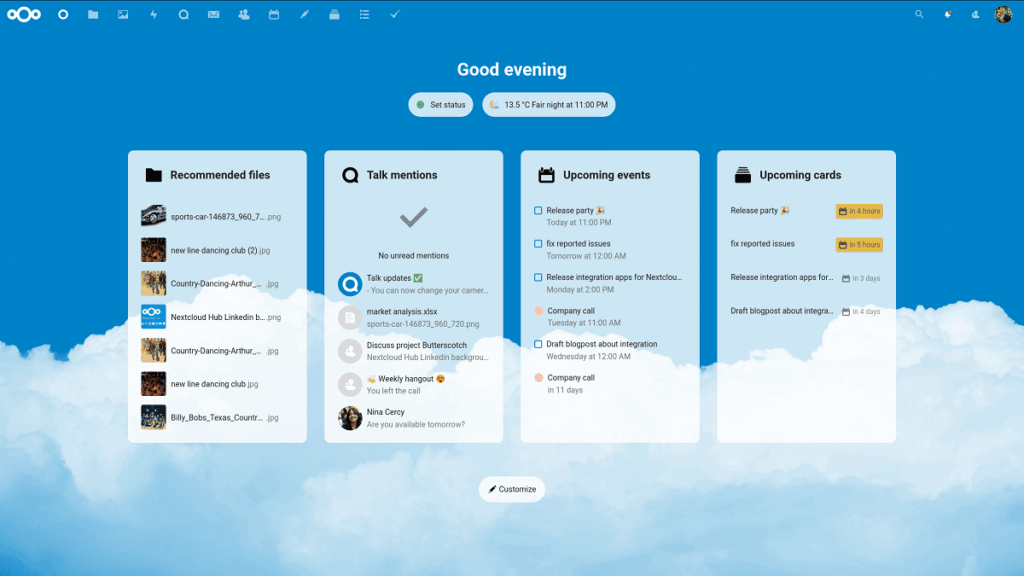
Nextcloud is different from everything else on this list: it’s self-hosted, open-source software you run on your own server or a hosting provider of your choice, rather than a service you subscribe to directly. That means full control over where your data physically lives, with cost depending entirely on your own hosting setup rather than a fixed subscription price. This is the right choice for IT-savvy businesses or privacy-conscious users who want to own their infrastructure outright. The limitation: it requires real technical setup and ongoing maintenance that most individual users won’t want to take on.
Virtual Data Room — for Confidential Business Documents
None of the tools above were built for what happens during an M&A deal, a fundraising round, or a due diligence process — situations where dozens of external parties (buyers, investors, lawyers, auditors) need controlled, trackable access to highly sensitive documents. A data room for confidential documents is purpose-built for exactly this: granular, folder-level permissions, full audit trails showing who viewed or downloaded what and when, dynamic watermarking, and structured Q&A workflows. Pricing is quote-based rather than a flat consumer subscription, scoped to the size and duration of your specific deal. If this is closer to your actual need than everyday file sync, see how virtual data rooms compare for confidential business document sharing.
Dropbox Pricing vs the Alternatives
Dropbox pricing starts with a free Basic plan at just 2 GB — one of the stingiest free tiers in this entire comparison. From there, pricing jumps straight to Plus at $9.99/month (billed annually) for 2 TB, then Professional at $16.58/month (billed annually) for 3 TB. Team plans start at $15/user/month with a 3-user minimum.
| Plan | Price | Storage |
| Basic | Free | 2 GB |
| Plus | $9.99/mo (annual) | 2 TB |
| Professional | $16.58/mo (annual) | 3 TB |
| Standard (team) | $15/user/mo (3-user min) | Pooled team storage |
The pattern that drives people to look for free Dropbox alternatives and cheap cloud storage options is clear in this table: there’s no mid-range option between the tiny free tier and a 2 TB jump, and several competitors — Google Drive and OneDrive in particular — offer smaller, cheaper paid tiers (like 100 GB for $1.99/month) that better match how much storage a lot of people actually need. For a fuller cloud storage comparison across every major provider, the quick comparison table above is the fastest way to see where each one lands.
Which Dropbox Alternative Should You Choose?
Best Dropbox Alternative for Photos & Personal Use
Google Drive is the easiest default if you already use Gmail or an Android phone — the free 15 GB and $1.99/month entry tier cover most personal needs, including photo libraries. If you want more free storage without paying anything, MEGA’s 20 GB free tier (with encryption by default) is the better starting point. Either is a solid Dropbox alternative for photos specifically, since both offer automatic mobile backup.
Best Dropbox Alternative for Business & Small Teams
OneDrive is the simplest Dropbox alternative for business if your team already runs on Microsoft 365. If you’re looking for the best cloud storage for small business with more advanced permissions, admin controls, and governance for a regulated industry, Box’s $15/user/month business plan is built specifically for that, even though it’s not worth it for personal use.
For Privacy-Focused Users (Private Cloud Storage)
Proton Drive and Sync.com are the two strongest picks for private cloud storage, both built around genuine end-to-end or zero-knowledge encryption rather than treating it as an afterthought. Proton Drive’s Swiss jurisdiction and bundled privacy suite (Mail, VPN, Calendar) make it the more complete ecosystem; Sync.com is the more storage-for-the-money option at 2 TB for around $8/month.
For Confidential Business Documents & Due Diligence
If you’re sharing sensitive financial, legal, or deal-related documents with external parties — rather than just backing up personal files — a virtual data room is the right category of tool, not a consumer cloud storage app. This is really a virtual data room vs Dropbox question rather than a choice between two similar products: the permissions, audit trails, and watermarking built for due diligence simply aren’t something Dropbox, Google Drive, or any tool above was designed to provide.
Dropbox vs Google Drive: A Closer Look
Dropbox vs Google Drive is one of the most common comparisons people search for, so it’s worth a direct answer. Google Drive wins on price and free storage: 15 GB free versus Dropbox’s 2 GB, and a $1.99/month entry tier for 100 GB that Dropbox simply doesn’t offer — Dropbox’s cheapest paid plan jumps straight to 2 TB for $9.99/month. Google Drive also has the edge for real-time collaboration, thanks to Docs, Sheets, and Slides.
Dropbox’s advantage is sync reliability and third-party app integrations built up over more than a decade, along with client-facing features like branded sharing links and Showcase on its Professional plan. If you’re a Google Workspace or Gmail user already, Drive is the easier, cheaper default. If you work across many different third-party apps and need rock-solid file sync specifically, Dropbox still has an edge worth paying for — otherwise, Google Drive is the better value for most people.
Is There a Secure Alternative to Dropbox for Businesses?
Consumer-grade cloud storage — Dropbox included — is built for convenience, not for the kind of controlled, auditable access that M&A due diligence, fundraising, or confidential document sharing require. Even the most secure cloud storage 2026 has to offer among consumer tools, like Proton Drive and Sync.com, is designed around personal and small-team encryption, not around managing dozens of external reviewers with different permission levels and a full audit trail.
This is the gap a virtual data room fills. Instead of a shared folder, you get granular permissions down to the individual document, dynamic watermarking that identifies who viewed what, detailed activity logs for compliance and audit purposes, and a structured Q&A workflow for managing buyer or investor questions. If your business need involves sharing sensitive documents with outside counsel, investors, or acquirers, compare virtual data room options built specifically for that purpose, rather than stretching a consumer storage app beyond what it was designed to do.
FAQ
Is there a free alternative to Dropbox? Yes — several, in fact. MEGA offers the largest free tier at 20 GB with encryption by default, Google Drive gives you 15 GB shared across Gmail and Photos, and both pCloud and Icedrive offer 10 GB free. All are meaningfully more generous than Dropbox’s 2 GB Basic tier.
What’s the most secure Dropbox alternative? For personal and small-team use, Proton Drive and Sync.com lead on security, both using end-to-end or zero-knowledge encryption by default — a reasonable answer to “most secure cloud storage 2026” for individuals. For business-grade security around confidential documents and due diligence specifically, a virtual data room goes further, with granular permissions and full audit trails that consumer tools don’t offer.
Is Google Drive better than Dropbox? For most people, yes, mainly on price: Google Drive’s free tier and $1.99/month entry plan beat Dropbox’s 2 GB free tier and $9.99/month jump to 2 TB. Dropbox still has an edge in sync reliability and third-party app integrations built up over many years.
What’s the best Dropbox alternative for a small business? It depends on what the business actually needs. OneDrive is the simplest choice for teams already using Microsoft 365. Box is better suited to businesses that need advanced permissions and governance. For due diligence, fundraising, or any process involving confidential document sharing with outside parties, a virtual data room is a better fit than any general-purpose cloud storage tool.
Is a virtual data room better than Dropbox for sensitive documents? For genuinely sensitive business processes like M&A, due diligence, or investor fundraising, yes. Dropbox and similar tools weren’t designed for granular, document-level permissions, audit trails, or watermarking — features a virtual data room builds around specifically for that use case.
Final Thoughts
The right Dropbox alternative really does depend on what you’re storing and who needs access to it. For everyday personal use and photos, Google Drive or MEGA cover most needs at a low cost. For privacy-focused storage, Proton Drive and Sync.com are the strongest picks. For small business collaboration, OneDrive or Box fit depending on whether you’re a Microsoft shop or need deeper governance controls.
But if what you’re actually trying to solve is secure, auditable sharing of confidential business documents — for an M&A deal, a fundraising round, or a due diligence process — none of the Dropbox alternatives above are quite the right tool for that job. A virtual data room is built specifically for it. See how virtual data room providers compare if that’s the need behind your search for a Dropbox alternative.